

WiFi Keyboard for PC
Use your computer as wireless keyboard for your android device.Updated October 8, 2023
WiFi Keyboard PC Details
| Category | Tools |
| Author | Ivan Volosyuk. |
| Version | 2.3.5 |
| Installations | 500000 |
| Size | 91.1 KB |
| What's New | 2.3.5:- Enter should work fine again. If it still broken, I'll disable submit on enter for single-line inputs.2.3.4:- Disable full screen mode in landscape- New key combinations supported: Ctrl-Del, Ctrl-Backspace.- No need to press "submit" button anymore. Enter will submit single-line messages, Ctrl-Enter will submit multiline messages.(Thanks Daniel Sim for the patch)Check out "AOSP WiFi Keyboard" if you want this keyboard combined with the standard one (thanks to Marcos Diez). |
WiFi Keyboard: The Ultimate Solution for Typing on Your Smartphone
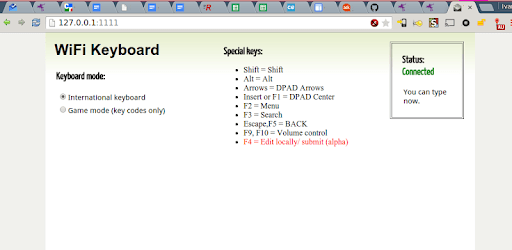
Are you tired of struggling to type on your smartphone's small screen and using your thumbs to compose messages? Look no further than WiFi Keyboard, the app that allows you to use your full computer screen and keyboard to effortlessly insert text into your device. This app is a must-have for any smartphone user who values convenience and efficiency.
With WiFi Keyboard, you can say goodbye to the frustrating days of typing with just your thumbs. This innovative app offers a range of features that make typing a breeze. Say hello to shortcuts like Ctrl+A to select all or Ctrl+HOME to quickly navigate to the beginning of a paragraph. These shortcuts will revolutionize the way you interact with your smartphone, saving you time and effort.
One of the standout features of WiFi Keyboard is its ability to transform your laptop into a powerful typing tool. Gone are the days of struggling to type on a small touchscreen. With this app, you can enjoy the ease and comfort of typing on a full-sized keyboard. Whether you're composing emails, chatting with friends, or working on documents, WiFi Keyboard ensures a seamless typing experience.
Installation is a breeze, and for those who encounter any difficulties, there's a helpful app video available on YouTube. This video provides step-by-step instructions to guide you through the installation process, making it easy for anyone to get started with WiFi Keyboard. Additionally, the app supports both WiFi and ADB connections, with ADB being the recommended option for optimal performance.
One of the standout qualities of WiFi Keyboard is its reliability. Users have reported that the app works flawlessly, providing a stable connection and consistent performance. For those who prefer not to check the app or app notification for the IP address, assigning a static IP to your phone's WiFi settings is a simple solution. Alternatively, using ADB allows you to type "localhost" instead of the IP address, eliminating the need to constantly check for changes.
Users have expressed their satisfaction with WiFi Keyboard, praising its convenience and ease of use. Many have highlighted the app's ability to eliminate the need to touch their phones while typing, as they can simply use their laptop's keyboard. This feature is particularly useful when the phone is placed next to the laptop, allowing for seamless and uninterrupted typing.
WiFi Keyboard has received rave reviews from users who have found it to be a game-changer. One user mentioned that they had been searching for an app to use their laptop keyboard as a controller and stumbled upon WiFi Keyboard, which fulfilled their needs perfectly. Another user expressed their delight at being able to play games on VR without having to purchase a Bluetooth controller, thanks to this app.
Overall, WiFi Keyboard is an easy-to-use application that offers a seamless typing experience for smartphone users. Its compatibility with various Android versions and its ability to connect through WiFi or ADB make it a versatile choice for anyone looking to enhance their typing experience. Say goodbye to the frustration of typing with your thumbs and hello to the convenience of WiFi Keyboard.
Frequently Asked Questions
1. How do I install WiFi Keyboard?
Installing WiFi Keyboard is a straightforward process. Simply follow the step-by-step instructions provided in the app video on YouTube, and you'll be up and running in no time.
2. Can I use WiFi Keyboard with any Android version?
Yes, WiFi Keyboard is compatible with all Android versions. Whether you're using an older version or the latest release, you can enjoy the benefits of this app.
3. What is the recommended connection method: WiFi or ADB?
While both WiFi and ADB connections work well, ADB is recommended for optimal performance. It ensures a stable and reliable connection, allowing you to type seamlessly on your smartphone.
4. How can I assign a static IP to my phone's WiFi settings?
To assign a static IP to your phone's WiFi settings, navigate to the WiFi settings menu and look for the option to set a static IP. Follow the on-screen instructions to complete the process.
5. Can I use WiFi Keyboard to play games on VR?
Absolutely! WiFi Keyboard allows you to use your laptop's keyboard as a controller, eliminating the need for a Bluetooth controller. Enjoy a seamless gaming experience on VR with this app.
Discover the convenience and efficiency of WiFi Keyboard today. Say goodbye to typing with your thumbs and hello to the ease of using a full computer screen and keyboard. Download WiFi Keyboard now and revolutionize your typing experience!
WiFi Keyboard in Action
How to Install WiFi Keyboard on PC
Below instructions allows you to download and install WiFi Keyboard app on Windows or MAC computer using an Android emulator. The process involves:
Download APK:Downloading the WiFi Keyboard APK file by choosing a version.
Install Android Emulator:There are a number of Android emulators the internet. Choose a emulator that works better with your PC. Now, download and install the Android emulator software.
Run the Emulator:Open the emulator you have just installed and configure the settings such as display, keywords, mouse etc.
Install Gene:Open the downloaded WiFi Keyboard APK file using the emulator, which will install WiFi Keyboard on Windows or MAC.